February 3, 2026
Log 3 - "LOL Nope" -JTAG Programmer
Okay I'll admit - I didn't expect this to work in the first place, just hoped for the best. The AliExpress reviews seemed to indicate that the programmer worked,
so, really, how hard could it be to set up? 6 hours of troubleshooting later, here we are. Here's how it went down:
After installing Quartus 15.1* natively on my Manjaro system, I connected the JTAG programmer to my computer, and the board to the programmer.
From there, I opened up Quartus, and went straight to Tools > Programmer.
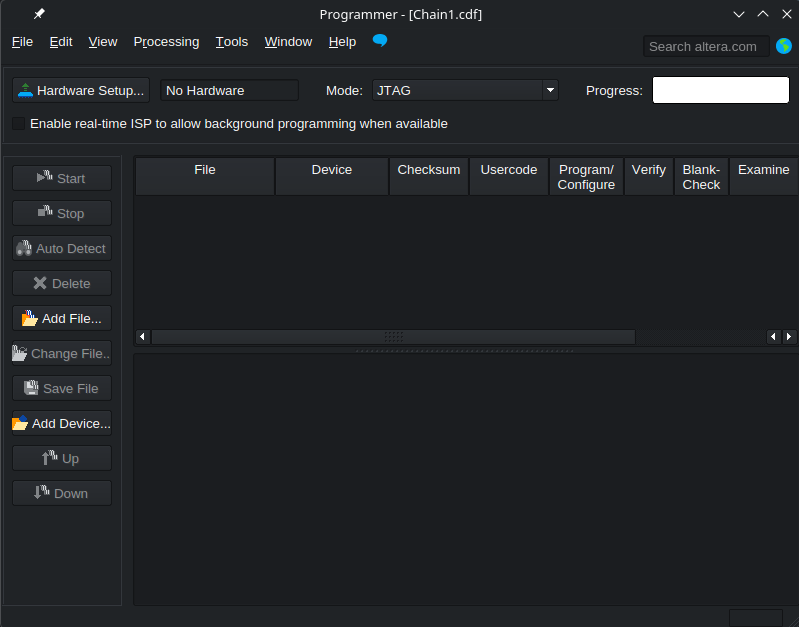
Upon clicking Hardware Setup, i was greeted with an empty list. Amazing!
I started by checking if the system detected the device at all:
lsusb | grep -i altera
This returned a line with the device ID 09fb:6001, which seemed to indicate that the device was at least detected by the system.
I then went to check the permissions of the device node:
ls -l /dev/bus/usb/*/*
Looking for my device's port and bus numbers from the previous command's output. I saw the device was owned by root, and per my research, Quartus
could not access USB devices not owned by the current user. So, I created a udev rule file:
sudo nano /etc/udev/rules.d/51-usbblaster.rules
Into which I added:
SUBSYSTEM=="usb", ATTR{idVendor}=="09fb", MODE="0660", GROUP="uucp"
After saving the file, I made sure I was in the uucp group and reloaded the udev rules using:
sudo usermod -aG uucp $USER

sudo udevadm control --reload-rules && sudo udevadm trigger
Then, as any good IT guy would do, I unplugged and replugged the blaster. Still not seeing anything on the GUI, I tried the CLI approach:
/opt/altera_lite/15.1/quartus/bin/jtagd
in one terminal, and in another:
/opt/altera_lite/15.1/quartus/bin/quartus_pgm -l
Weirdly though, the jtagd refused to daemonise. It just started and immediately stopped. "Correct me if I'm wrong," I thought, "but that's not how daemons work..."
So let's go investigate the alleged daemon. First, we check if it's already running, thus killing my attempts to start a second instance:
psgrep -a jtagd

>ps aux | grep -i jtagd | grep -v grep
Nothing shows up. No running daemons. Next, I try to run it with the --help flag to see if there's anything I'm missing:
sudo /opt/altera_lite/15.1/quartus/bin/jtagd --help
That gives me:
                jtagd


                Version 25.1std.0 Build 1129 10/21/2025 SC Standard Edition


                Copyright (C) 2025 Altera Corporation. All rights reserved.


                Usage: jtagd [--user-start] [--config <\filename>] [--version] [--help | --extrahelp]


                You should not need to run this command. Please use the jtagconfig command to control the JTAG Server.


                ...
Ah. You should not need to run this command. Please use the jtagconfig command to control the JTAG Server..
Let's try jtagconfig, then:
/opt/altera_lite/15.1/quartus/bin/jtagconfig
Returning:
No JTAG hardware available.
Huh. So we know the device is there and readable by the system, but the Quartus JTAG tools refuse to claim it.
After some more digging, it turns out that Quartus has an env script that I need to run to set up variables and the like. I tried running it in my
zsh terminal, but that would immediately crash it. Crap. So, I tried running it in a bash terminal, which complained about not being able to find the
QUARTUS_ROOTDIR env variable. Here's the code that finally got that fixed.
bash -lc '
                        export QUARTUS_ROOTDIR=/opt/altera_lite/15.1/quartus
                        source /opt/altera_lite/15.1/quartus/adm/qenv.sh
                        /opt/altera_lite/15.1/quartus/bin/jtagconfig'
Well, at least it doesn't crash now. Let's add the env vars to my ~/.zshrc so I don't have to do this every time:
                    export QUARTUS_ROOTDIR=/opt/altera_lite/15.1/quartus
                    export PATH=$QUARTUS_ROOTDIR/bin:$PATH
Result? No. JTAG. hardware. available. End my suffering. Let's see the debug mode on jtagconfig:
sudo /opt/altera_lite/15.1/quartus/bin/jtagconfig --debug
The result? Just over 3000 words worth of debug output. Skimming through it, I found something interesting. jtagd wasn't a daemon. It was just a
wrapper script that spawns shell commands and loads stuff: off we go to investigate the jtagd script. I installed strace
to see what was going on, and finally found the culprit: jtagd kept exiting because it couldn't bind to the localhost 1309 port.
Why?? I had already taken care of anything that might be using port 1309??
grep aux | grep -E 'jtagd|1309' | grep -v grep
                    LISTEN 0 0 0.0.0.0:1309 0.0.0.0:* users:(("wineserver", pid=...))

...
"LOL, Nope." Turns out, I didn't uninstall Wine Quartus properly, and it was still running a jtag server.
After killing all Wine processes and uninstalling the Wine Quartus properly, I restarted my computer to be sure, and tried again.
Let's try that again:
                    sudo /opt/altera_lite/15.1/quartus/bin/jtagd --user-start
                    /opt/altera_lite/15.1/quartus/bin/jtagconfig
1) USB-Blaster [13-4.2]
Finally!!! Let's open up the Quartus Programmer GUI again, and check Hardware Setup. This time, the USB-Blaster showed up. However,
when I went to auto-detect hardware, I got an empty list. Back to the CLI we go:
/opt/altera_lite/15.1/quartus/bin/jtagconfig -c 1 -n
Error when scanning hardware - No devices
Looks like our device chain is empty. Here are the next couple hours of troubleshooting boiled down to a few lines.
Let's go gambling!
- Check that the FPGA and Blaster are both powered (Aw, dang it.)
- Check that the cable is seater properly (Aw, dang it.)
- Check the pinouts of the Blaster and FPGA board (Aw, dang it.)
- Use the pinouts to manually wire the 10-wire connection using jumper cables (Aw, dang it.)
- Realise it might just be that one of the Chinese mfg.s misread the diagram and flipped the pinout 180 degrees. So, cut a hole in the Blaster to make the wire fit the other way around, and try again. (Aw, dang it.)
- Use a multimeter to confirm the connections between the board and blaster (Aw, dang it.)
- Swap the jumper cables on the FPGA board to change the logic level, confirm the logic level is being reached on the blaster (Aw, dang it.)
- Try changing the timing on the Blaster between the default, 6M, 1M, and 250k (Aw, dang it.)
- Go back and check the AliExpress listing for the blaster, and see this comment:

"...but to make it work with CycloneIV EP4CE6E22C8N, you need to flash it with new firmware."
Ah.
Of course.
Since this wasn't a true CPLD-based USB-Blaster, but a CH552G-based clone, and a cheaply-made one at that, any minor difference in (I can only assume) the timing would cascade into an inability to detect devices on the JTAG chain.
Luckily, there were a few options, both closed- and open-source to flash. And instructions, courtesy of elerain.com (which was based off Doug Brown's work (which was based off Vladimir Duan's unfixed CH55x sources (you can see how fun the open-source community is - at least everyone gives credit!)))
Anyway, turns out that there was only a chance that this CH552G clone would work, and to do so, I had to (find! and) solder a, say, 10k resistor between D+ and 3v3. I looked at the pins on the board, and saw that the pins were thinner than the resistor legs themselves. I then looked at Doug's site, who seemed to be smart enough to buy a board with test points (Remember kids! Always buy cheap Chinese electronics with test points!).
At this point, I had a few options: I could suffer through trying to solder the resistor legs to the tiny pins, with only a hope that this might work. I could buy a new CH552G-based blaster clone with test points on AliExpress for about 10 bucks, OR I could do the sensible thing and buy a CPLD-based Altera USB-Blaster v2 (which still seems to support my CycloneIV board). Having been fed up with the knockoffs and all their associated fun, I dropped about 50 dollars on a used V2 blaster off Ebay.
Now, we wait for it to arrive. Let's hope this won't be an enormous waste of money and 2 weeks of waiting...